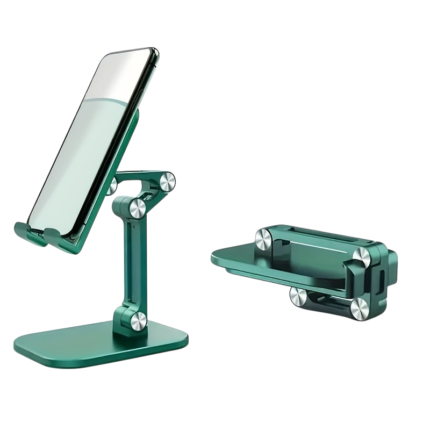
Foldable Mobile And Tablet Holder With Adjustable Height
This foldable mobile and tablet holder provides a practical tabletop position for smartphones and tablets. The holder’s height and angle can be adjusted, allowing the screen to be positioned more conveniently for video calls, films, reading, work, recipes, and general use at the desk.
The collapsible design makes the holder easier to store or take with you in a bag. The wide base and non-slip contact surfaces help keep both the stand and the device stable on the table.
Key Benefits
- Suitable for both smartphones and tablets.
- Fits devices with a screen size of approximately 10.2–32.8 cm.
- Adjustable height with a movement range of approximately 6.5 cm.
- Multiple movable joints allow for screen angle adjustment.
- The holder part can be tilted approximately 120°.
- The bottom joint can be adjusted approximately 90°.
- Can be used with the device in both standing and lying positions.
- Foldable design makes the holder easier to transport and store.
- Non-slip contact surfaces protect the device and limit movement.
- Wide base provides stable support on desks, kitchen worktops, and other flat surfaces.
- Open holder design covers only a limited part of the screen.
- Weighs approximately 226 g.
Overview
This adjustable desk holder for mobile and tablet is designed for situations where the screen needs to be visible without being held in hand. The device is placed on the two lower support points and leans against the holder’s back plate.
The movable joints allow for changes in both height and tilt. The screen can thus be placed low and slightly reclined or raised to a more upright position, depending on the workspace and the chosen device.
The holder can be used for smaller smartphones as well as larger tablets. The stated compatibility includes devices with screen sizes from approximately 10.2 to 32.8 cm measured diagonally.
When the holder is not in use, the arms can be folded together over the base. This reduces the overall size and makes it practical to place in a drawer, work bag, or backpack.
Dimensions And Specifications
| Product Type |
Foldable Desk Holder For Mobile And Tablet |
| Materials |
PC Plastic, Silicone, And Aluminium Alloy |
| Compatible Screen Size |
Approx. 10.2–32.8 cm measured diagonally |
| Height Adjustment |
Approx. 6.5 cm |
| Angle At Holder Part |
Up To Approx. 120° |
| Angle At Bottom Joint |
Up To Approx. 90° |
| Orientation |
Standing Or Lying |
| Construction |
Foldable Arm With Multiple Adjustable Joints |
| Contact Surfaces |
Non-slip And Shock-absorbing Silicone Details |
| Base |
Wide And Flat Desk Base |
| Weight |
Approx. 226 g |
| Power Supply |
No Power Or Batteries Required |
| Usage |
Video, Reading, Work, Calls, Recipes, And Entertainment |
| Package Contents |
1 Foldable Mobile And Tablet Holder |
Adjustable Height
The holder’s upper part can be moved up and down by approximately 6.5 cm. This allows the device to be raised from the tabletop and adjust the position according to the user’s sitting posture and the screen size.
A higher position can be practical for:
- Video calls and online meetings.
- Reading messages and documents.
- Using an extra screen next to the computer.
- Viewing recipes on the kitchen worktop.
- Streaming films and series.
- Teaching and digital courses.
When used with a larger tablet, the height should be adjusted so that the weight remains centred over the base.
Multiple Adjustable Angles
The stand has several movable joints, allowing for screen tilt adjustment. The holder part can be tilted approximately 120°, while the bottom joint can be adjusted approximately 90°.
The angle can be changed so that the screen stands more upright during video calls or leans back further during reading and entertainment.
The various joints allow for adjustments to:
- Screen tilt.
- The distance between the screen and the user.
- The overall height of the holder.
- The placement of the device’s centre of gravity.
- Standing or lying view.
Adjust the joints with gentle movements. When used with a larger tablet, it is recommended to support the device with one hand while changing the angle.
For Smartphones And Tablets
The holder fits devices with screen sizes from approximately 10.2 to 32.8 cm. It can therefore be used with many common smartphones, smaller tablets, and larger tablets.
It can be used for:
- Smartphones.
- Smaller Tablets.
- Larger Tablets With A Screen Of Up To Approximately 32.8 cm.
- E-book Readers With Suitable Dimensions.
- Other Flat Devices That Can Stand Stably On The Support Points.
Devices with very thick covers or unusually strong edges may affect the fit. Therefore, check that the device can rest securely on the lower support arms.
Standing And Lying Placement
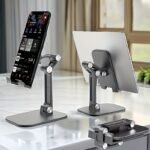
The mobile phone or tablet can be placed both vertically and horizontally. This makes the holder useful for different types of content.
Standing Placement is practical for:
- Video calls.
- Reading messages.
- Social media.
- Short videos.
- Phone operation at the desk.
Lying Placement is practical for:
- Films and series.
- Longer videos.
- Presentations.
- Recipes and guides.
- Games with external controls.
Place the device in the middle of the holder so that the weight is evenly distributed between the two support points.
Non-slip Contact Surfaces
The holder’s contact areas are equipped with silicone details. They help limit direct contact between the device and the harder parts of the construction.
The non-slip surfaces can help to:
- Keep the phone or tablet more stably placed.
- Limit minor movements when touching the screen.
- Protect the device’s back and bottom edge from direct contact.
- Create better grip between the stand and the tabletop.
- Reduce common sliding movements during use.
The silicone surfaces should be kept free of dust and grease, as dirt can reduce grip.
Stable Base For The Table
The wide, flat base helps distribute weight on the table. Together with the adjustable arm, the construction forms a stable support around the device’s centre of gravity.
The holder should always be placed on a flat and firm surface, such as:
- Desk.
- Kitchen Worktop.
- Dining Table.
- Bedside Table.
- Meeting Table.
- Reception Desk.
- Shelf With Sufficient Depth.
Soft, slanted, or uneven surfaces can reduce stability and should be avoided.
Foldable And Easy To Store
The movable joints allow the holder to be folded together, bringing the holder part and arms closer to the base. This reduces the space needed between uses.
The foldable design makes the holder practical for:
- Storage in a desk drawer.
- Transport in a work bag.
- Use in the office and at home.
- Travel and temporary workspaces.
- Teaching and study use.
- Placement in a kitchen cabinet after use.
Fold the holder together slowly, and ensure that fingers do not get pinched between the joints.
For Work And Video Calls
During video calls, the phone can be placed in a standing position, while the height and angle are adjusted to the camera’s position. This frees the hands and allows for working on the computer or taking notes during the conversation.
The holder can be used for:
- Online meetings.
- Video calls with family and friends.
- Digital teaching courses.
- Streaming and recording short videos.
- Viewing calendar, messages, and work tasks.
The holder does not include a microphone, camera, charger, or other electronics.
For The Kitchen And Recipes
The tablet or phone can be placed on the kitchen worktop so that recipes and instructional videos are visible during cooking.
Place the holder at a suitable distance from:
- Water and sink.
- Hotplates and open flames.
- Hot pots and pans.
- Oil, steam, and other splashes.
- Areas where it can be pushed down.
The holder is not waterproof and should not be placed where it or the mounted device can be exposed to liquid.
Open Construction Around The Screen
The device rests on two separate support points at the bottom edge. Therefore, the construction only covers a limited part of the screen’s front.
This makes it easier to see subtitles, control panels, and other content close to the bottom area of the screen. The precise visibility depends on the device’s size, screen format, and placement.
Check that the support arms do not cover buttons, speakers, or connection ports that need to be accessible during use.
How To Use The Holder
- Place the folded holder on a flat and stable surface.
- Fold the arm up from the base.
- Set the desired height.
- Adjust the holder part’s angle.
- Place the phone or tablet on the lower support points.
- Centre the device on the holder.
- Check that the device rests against the back plate.
- Adjust the angle again if the screen is not positioned appropriately.
- Check stability before operating the screen.
For large tablets, the stand should be held stable with one hand when placing or removing the device.
Adjusting The Height And Angle
- If necessary, remove the heavy tablet before making larger adjustments.
- Hold the base firmly with one hand.
- Move the desired joint slowly with the other hand.
- Set the arm so that the device’s weight remains over the base.
- Place the device back on the holder.
- Check that the joints hold the chosen position.
Do not use excessive force on the joints, and do not rotate them further than the construction allows.
Cleaning And Maintenance
Remove the phone or tablet before cleaning. Wipe the stand with a dry or slightly damp, soft cloth.
Carefully clean the silicone surfaces if they have collected dust or grease. Wipe all parts thoroughly before placing the device on the holder again.
Avoid:
- Submerging in water.
- Cleaning in a dishwasher.
- Scouring sponges or hard brushes.
- Strong chemical cleaners.
- Oil or lubricants on the joints.
- Direct heat during drying.
Regularly check the joints and support points for cracks, looseness, or other damage.
Safe Use
The holder must stand on a stable surface and should not be placed close to the edge of a table. Ensure that the device fits properly and is not heavier or larger than the stand can hold stably.
Avoid:
- Pressing hard on the screen while the holder is set high.
- Placing the stand on a bed, sofa, or other soft surface.
- Carrying the holder by only holding the mounted device.
- Moving the stand with a heavy tablet mounted.
- Letting small children play with the movable joints.
- Placing fingers between the joints during folding.
Stop using if a joint no longer holds the chosen position.
Practical Holder For Desk And Home
This foldable mobile and tablet holder with adjustable height combines several movable joints, non-slip contact surfaces, and a stable desk base. It can be used with devices of approximately 10.2–32.8 cm and adjusted for both standing and lying views.
The holder is suitable for work, video calls, reading, recipes, and entertainment. Mobile phone, tablet, charger, and other accessories are not included.








 Free delivery on orders of £5 or more
 14-Day Full Returns
 100% Secure Payments